How to Buy Cryptocurrency
Select your preferred exchange to see step-by-step instructions.
Key Takeaways
- Binance offers various deposit options: P2P, Cash, Crypto, and Bank transfers.
- Withdrawals can be done via Crypto or Fiat, requiring specific security verifications.
- Safety First: Always double-check networks and bank details to avoid accidental loss of funds.
When it comes to crypto, depositing and withdrawing funds can be confusing. In this guide, we walk through the options available on Binance so you can seamlessly manage your funds.
How to Deposit to Binance
- Access your Binance account, click [Deposit], and select the [P2P Trading] option.
- Select the cryptocurrency you want to buy, the currency you will purchase it with, and your payment method.
- Browse through the list of available sellers, checking their rates and terms.
- Select a seller and follow the provided instructions to make the payment through the agreed-upon method.
- After the seller confirms receipt of payment, the cryptocurrency will be released to your Binance wallet.
- Access your Binance account, click [Deposit], and select [Buy Crypto].
- Specify the cryptocurrency you wish to purchase, the currency you will buy it with, and the amount.
- Choose Credit/Debit Card. Click [Add New Card] and fill out the necessary information.
- Follow the prompts to complete the transaction. The crypto will be credited to your wallet.
- Access your Binance account, click [Deposit], and select [Deposit Crypto].
- Choose the cryptocurrency you want to deposit.
- Important: Select the network for the deposit and make sure that it matches the network you are sending the crypto from.
- Copy the deposit address provided by Binance.
- Go to the platform where your crypto is stored, paste the Binance deposit address, and initiate a transfer.
- Access your Binance account, click [Deposit], and select [Bank Deposit].
- Choose the fiat currency and pick a bank transfer option (e.g., SEPA).
- Enter the amount you want to deposit.
- Complete the transfer from your bank using the details provided.
Note: The name on your bank account must match your Binance account.
How to Withdraw From Binance
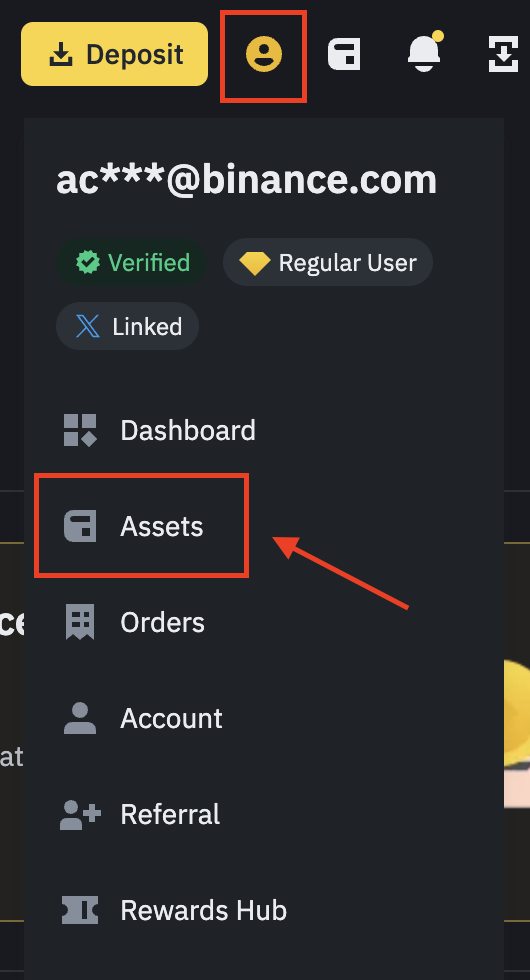
- Go to [Assets] and click [Withdraw]. Select the crypto to withdraw.
- Input the receiving address (e.g., your LuStock wallet) and select the correct network.
- Specify the withdrawal amount.
- Complete security verifications (2FA, Email Confirmation) to finalize the withdrawal.
- Go to [Assets], click [Withdraw], and select [Withdraw Fiat].
- Select the currency (e.g., USD, EUR).
- Pick the withdrawal method (e.g., SWIFT, SEPA).
- Enter your bank details and amount.
- Review details, confirm, and complete security checks.
View the full article on Binance Academy
Why Choose Swyftx?
- Australian Owned: Registered with AUSTRAC and tailored for AU/NZ residents.
- Instant Funding: Supports Osko & PayID for near-instant AUD deposits.
- Low Fees: Competitive 0.6% trading fee and small spreads.
- Demo Mode: Practice trading with $10k virtual cash before using real money.
Swyftx is widely considered the best option for beginners in Australia. Below is your complete guide to getting started, funding your account, and withdrawing profits.
1. Getting Started
You can trade on the go using the mobile app.
Note: You must be 18+ and a resident of Australia or New Zealand.
Using the App:
- Open the app and select Create an account.
- Enter your country, full name, email, and mobile number.
- Verify your email address and create a secure password.
- Complete the Initial ID Verification to start trading.
Using the Web:
- Go to the Swyftx Homepage and click Sign Up.
- Fill in your personal details and verify your email.
- Follow the prompts to verify your ID (Driver's Licence or Passport recommended).
2. How to Buy Crypto (AUD)
Instructions:
- Navigate to Deposit (Sidebar on Web, Dashboard button on App).
- Select Australian Dollars (AUD).
- Choose PayID (Instant) or Bank Transfer.
- Copy the details provided (PayID email or BSB/Account Number).
- Paste these details into your regular banking app and send the funds.
- Navigate to the Trade tab.
- Select Buy and search for the asset (e.g., Bitcoin).
- Enter the AUD amount you wish to spend.
- Click Instant Buy to confirm. The assets will appear in your wallet immediately.
3. How to Withdraw Money
App Instructions:
- Tap Withdraw from the dashboard.
- Select Australian Dollars.
- Select your bank account (or tap Add Account).
- Enter the amount and tap Withdraw.
Web Instructions:
- Click Withdraw on the sidebar menu.
- Choose Australian Dollars.
- Select the destination bank account and enter the amount.
- Click Continue and complete the 2FA verification.

Platform Highlights
- 320+ Assets: Huge variety of coins.
- Low Spreads: Save money on every trade.
- Tax Reports: Downloadable reports for ATO compliance.
- Auto-Invest: Set up recurring deposits (DCA).
Visit Swyftx
Why Choose Independent Reserve?
- Institutional Grade: The first regulated exchange in Australia. ISO 27001 Certified security.
- Multi-Currency: Trade directly with AUD, USD, SGD, and NZD.
- OTC Desk: Private execution for large orders over $50,000 to avoid price slippage.
- Audited: Fully audited reserves, ensuring your funds are held 1:1.
Independent Reserve is the preferred choice for sophisticated investors, trusts, and SMSFs. Below is a guide to managing your account securely.
1. Getting Started
Manage your portfolio securely on the go.
Independent Reserve has strict compliance standards.
- Sign up at independentreserve.com.
- Choose Personal, Company, or Trust/SMSF account type.
- Verify your email and enable 2-Factor Authentication (2FA) immediately.
- Upload your ID documents. Verification is usually completed within 24 hours.
2. How to Buy (Deposits)
- Log in and click Accounts at the top.
- Find your currency (e.g., AUD) and click Deposit.
- For AUD: Use PayID/Osko for instant transfers.
- For USD/SGD/NZD: Use SWIFT/Telegraphic Transfer instructions provided.
- Note: Deposits must come from a bank account in your own name.
- Go to the Trade screen.
- Ensure your currency is selected (top right).
- Select the pair you want (e.g., BTC/AUD or USDT/USD).
- Enter the amount you wish to buy.
- Click Preview Buy Order then confirm.
3. How to Withdraw
- Go to Accounts and click Withdraw on your chosen crypto.
- Click Add Account to add your LuStock or external wallet address.
- You will receive an email/SMS to confirm this new address.
- Once confirmed, select the address, enter the amount, and click Withdraw.
- Navigate to the Accounts page.
- Select the Fiat currency (e.g., USD) and click Withdraw.
- Select your linked bank account.
- Enter the amount and submit.
- Processing Times: AUD is usually same-day; International transfers take 1-3 business days.

Platform Highlights
- Audit: KPMG Audited Reserves.
- Insurance: Insurance on crypto held in cold storage.
- Fees: Trading fees start at 0.5% and decrease with volume.
- API: Powerful API for algorithmic traders.
Visit Exchange